
Presenting data in a structured and visually attractive manner is essential for enhancing readability and user engagement. A table plugin enables you to effortlessly create, manage, and display tables on your website without the need for manual coding.
With table plugins, you can highlight pricing plans, compare product features, display schedules, and present intricate datasets. In this article, we’ll introduce you to some of the top WordPress table plugins, allowing you to make comparisons.
Take a moment to review the plugins listed in the table below that we will cover in this article.
| Plugin | Rating | Feature Highlights | Download |
| Tableberg | Block-based 27+ templates | Download | |
| WP Table Builder | 14+ elements 27+ templates | Download | |
| Ninja Table | 15 templates Backend editor | Download | |
| TablePress | Add formulas Highly flexible | Download | |
| wpDataTables | 28+ templates Design charts | Download | |
| Visualizer | Design charts Translation | Download | |
| Data Tables Generator | Backend editor Translation | Download |
Let’s explore them now.
| Product | Price | Rating | Active installs |
|---|---|---|---|
| Tableberg | Free + paid | 4.8/5 | 4,000+ |
| WP Table Builder | Free + paid | 4.8/5 | 50,000+ |
| Ninja Tables | Free + paid | 4.6/5 | 70,000+ |
| TablePress | Free + paid | 5.0/5 | 600,000+ |
| wpDataTables | Free + paid | 4.5/5 | 60,000+ |
| Visualizer | Free + paid | 4.4/5 | 20,000+ |
| Data Tables Generator by Supsystic | Free + paid | 4.7/5 | 10,000+ |
Tableberg

Tableberg is a block-based, feature-rich table builder plugin. Like the Gutenberg block editor, you can add various blocks with the cells of the Tabelberg plugin. The List, Icon, Button, Rating, Ribbon, Image, etc., are popular blocks.
Tableberg comes with a vast library of pre-designed templates. You can individually change the cell, row, and column color of the table. The plugin will soon release more exceptional features, like XML & CSV import ability, AI table, WooCommerce table, and post table.
Apart from traditional pricing, comparison, product listing, and infographics, Tableberg can be Used to create feature boxes, service boxes, icon boxes, and various web sections. You can use it as a web design tool.
Key features of Tableberg:
- Allows customizing every single table element
- 27+ pre-designed templates
- Tables are built-in mobile responsive
- Make the first row/column sticky
- Lets you add the search box on the table
- Easy to sort table data vertically and horizontally
- Enable breakpoint if you wish
- Remove/modify table borders
- Set Global font and link color
- Enable/disable header and footer for the table
- Integration with XML & CSV files, WooCommerce, and AI are coming soon
Pros
- Builds tables from editable sub-blocks inside the block editor
- Free core with paragraph, list, button and image cells
- Responsive and alignment controls for table layout
Cons
- Star Rating, Styled List, Icon and Ribbon blocks need the Pro version
- Requires the block editor; not a table editor for classic editor sites
- Usage tracking is offered through Freemius and stays off unless opted in
WP Table Builder
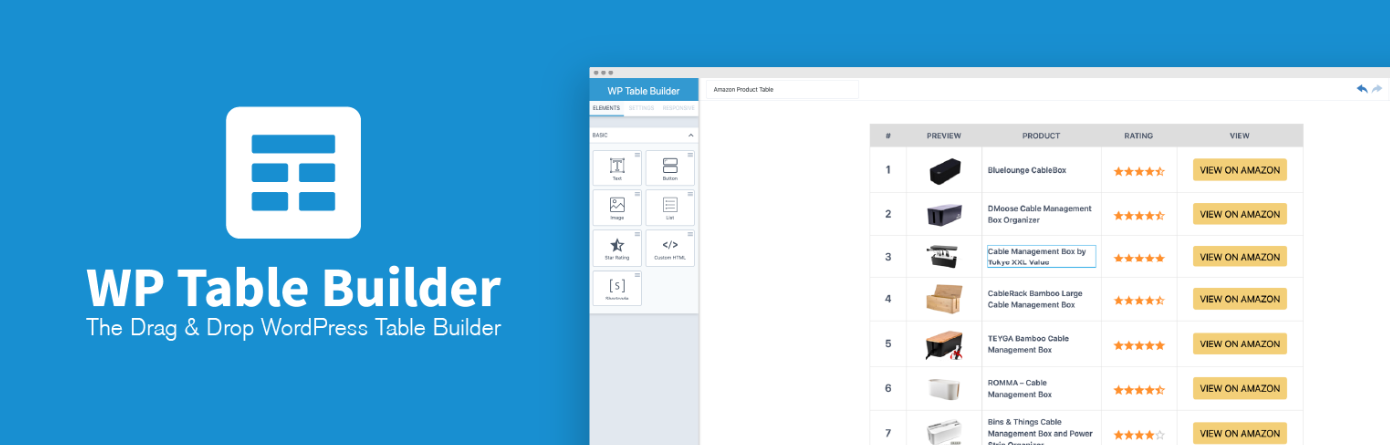
WP Table Builder is a drag-and-drop table builder plugin. Those who have experience with any page builder tool can work with this plugin like a pro. You can add various elements to the table as the Tableberg plugin, like images, lists, buttons, ratings, icons, progress bars, ribbons, etc.
The WP Table Builder plugin also provides a good collection of readymade templates, so you can save time while building tables. Once a table is ready, it generates a shortcode that you can paste anywhere on web posts and pages to display it.
You can configure user roles to limit who can customize the table later on. By adding table tags, you can easily organize tables in the backend. This is effective when you have many tables on your site.
Key features of WP Table Builder:
- Includes 27+ pre-built templates
- Allows comprehensive customization of table elements
- Easy to import and export tables
- Lets you add a search bar, pagination, and a sticky row/column
- Responsive for all device types
- Works both with Gutenberg and page builders
- Provides all the necessary documentation
Pros
- Drag and drop table building without code
- Table block and shortcode for placement
- Import and export of tables
Cons
- Premium features need the Pro addon
- Pro addon is delivered through Freemius
- Opt-in usage tracking through Freemius SDK
Ninja Tables


Ninja Table is another great drag-and-drop table builder plugin. It allows you to add Text, Buttons, Icons, Ratings, Lists, HTML codes, Shortcodes, and Images to the table to organize and present your desired information.
After the plugin is installed, Ninja Table greets you with an intuitive dashboard where you are allowed to create your desired tables. Each table generates a shortcode that you can add anywhere on your web posts and pages.
If you aren’t comfortable with the drag-and-drop editor, you can create table manually as well. Ninja Table includes this option as well.
Key features of Ninja Table:
- 15 pre-designed templates
- Lets you create charts and graphs
- Easy to import and export tables
- Perfectly responsive for all device types
- Has conditional table formatting
- Authorize frontend and backend table editing
- Integrations with Fluent Forms, Google Sheet, and WooCommerce product table
Pros
- Builds responsive tables with a visual editor and no code
- Ready-made templates and CSV import to start quickly
- Can pull entries from Fluent Forms into a table
Cons
- Google Sheets as a data source needs the paid Pro add-on
- Pro upgrade prompts and licence notices in the admin menu
- Deactivation and lead forms contact the vendor site when the user agrees
TablePress
TablePress is the most used table-builder plugin, with 700,000+ active users and 4,450+ five-star ratings. Like the above two, TablePress allows you to create your tables first in the backend. After that, you can display them on the frontend using shortcodes.
Although the plugin is flexible in table formatting, it doesn’t allow you to add as many elements as the above three plugins. You can add images, buttons, and links only. However, the exceptional feature that TablePress includes is adding mathematical formulas.
Key features of TablePress:
- Add live sorting, pagination, and searching
- Lets you import and export tables in suitable formats
- Compatible with Gutenberg editor and page builders
- Easy to highlight cells, columns, or any information
- Allows to display data to other platforms via REST API
Pros
- Spreadsheet-style editor with CSV, Excel, HTML and JSON import and export
- Embeds through a block, an Elementor widget or a shortcode
- Large, long-running free plugin with a mature table feature set
Cons
- Advanced features and priority support need a premium licence
- Table data lives in the plugin's own storage, not in post content
- Usage tracking through Freemius is offered and stays off unless opted in
wpDataTables

Suppose you are looking for a plugin to quickly create data tables and charts using data and information directly from Excel, CSV, XML, JSON, PHP, and other data resources. In that case, you must consider the wpDataTables plugin in your checklist.
wpDataTables provides a dashboard in the backend to generate as many tables as you want. After that, you can display them on the frontend using shortcodes. The plugin offers over two dozens of pre-designed templates to save your time.
Key features of wpDataTables:
- 28+ pre-designed templates
- Easy to set fixed headers and columns
- Display single cells in your content using shortcodes
- Organize tables in the backend using folders
- Hide any columns you want
- Integrations with Divi and Avada
- Allows to add ratings, images, and custom links to tables
Pros
- Imports Excel, CSV, XML, JSON and nested JSON sources
- Charts with Chart.js or Google Charts, plus table shortcodes
- Blocks and modules for Gutenberg, Elementor, Divi, Avada and WPBakery
Cons
- Premium needed for WooCommerce tables, folders and Google Sheets API
- Remote JSON, XML and Excel sources must be reachable from the server
- Table data is only as current as the source it is loaded from
Visualizer

Visualizer is maintained by the famous WordPress developer company Themeisle. The plugin leverages some advanced libraries, like Google Visualization API, DataTables.net, and ChartJS libraries to deliver responsive and animated charts, graphs, and tables.
You can manage advanced data sets and present them in various chart types. They are Pie, Line, Area, Geo, Bar, Column, Gauge, Scatter, Candlestick, Table, Timeline, and Combo. But as the plugin is a bit advanced, it has a higher learning curve.
Key features of Visualizer:
- Synchronize data automatically with CSV, Google Sheets, or external APIs
- Create interactive charts from scratch or using templates
- Configure user roles for those who can customize the tables and charts
- Add filter, pagination, and search options
- Translation in multiple languages is included
Pros
- Charts and tables from manual data, with a Gutenberg block and Elementor widget
- Built-in AI chart builder from a text prompt
- Free version covers common chart types
Cons
- AI builder calls the vendor's service
- Some chart types and imports need the Pro add-on
- Usage tracking is opt-in through a logger flag in the settings
Data Tables Generator by Supsystic

This is a simple yet effective plugin. It provides an editor in the backend dashboard to create tables. The editor is almost similar to the old Classic editor. You can add text and various media files (images, videos, audio clips) to the table.
Integration with WooCommerce lets you display products from the WooCommerce store. By adding search, sorting, pagination, and filtering options, you can make the table easy for users to explore.
Key features of Data Tables Generator by Supsystic:
- Import/export in CSV, Excel, PDF, Google Sheets
- Create Diagrams, Charts and Graphs
- Responsive and support large tables
- Formulas and HTML support
- The translation is available in 15 languages
Pros
- Paste ranges from a spreadsheet straight into the editor
- WooCommerce product tables and pricing tables in the free version
- Gutenberg block, classic widget and Elementor widget
Cons
- Imports, exports, charts and front-end editing are Pro only
- Custom table fonts are loaded from Google Fonts
Wrapping Up!
The success and functionality of your website significantly hinge on choosing the right plugin. Opting for the wrong plugin can lead to costly issues down the line. That’s why we’ve compiled a list of the best WordPress Table plugins above, allowing you to choose one that aligns with your specific feature requirements.