Moving a WordPress site can seem like a daunting task. With plugins, themes, and sometimes thousands of media files it can be difficult.
Luckily there are plenty of WordPress migration plugins that make moving a site as simple as possible.
Here is our list of the Best Migration Plugins for WordPress:
| Product | Price | Rating | Active installs |
|---|---|---|---|
| Duplicator | Free + paid | 4.9/5 | 1M+ |
| VaultPress | Paid | 3.8/5 | 10,000+ |
| WP Migrate DB | Free + paid | 4.2/5 | 200,000+ |
| UpdraftPlus Migrator | Paid | ||
| All-in-One WP Migration | Free + paid | 4.5/5 | 5M+ |
| Migrate Guru | Free | 4.9/5 | 200,000+ |
| Super Backup & Clone | Paid |
Duplicator
Duplicator is one of the most popular migration plugins among WordPress users because of its versatility and flexibility. It can easily handle standard backups along with cloning your site to a completely new domain. Plus we’ve written a step-by-step guide to using Duplicator.
In addition to cloning your WordPress site Duplicator can also backup your site to prevent data loss.
Duplicator is considered as one of the best WordPress migration plugins.
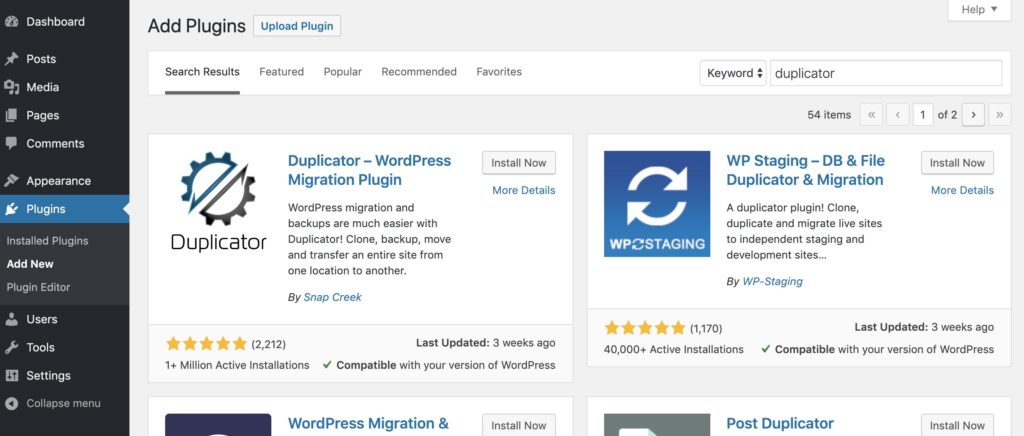 Duplicator in the WordPress repository
Duplicator is quite easy to use and it works on most hosting environments.
The plugin can be used to create a “package” of your entire WordPress website. That package will contain all the essential files of the existing website along with an installer file too.
Duplicator backup “package” creation page
Once you have that package you can move your files to a new server and run the Duplicator installer.
If you just want to backup your website, all you have to do is to keep the files in a completely safe location (like Dropbox or Google Drive). But in case you migrating the website, you will have to upload the packaged files in your new server via FTP.
Duplicator will automatically set up everything on the new server. You can also change the domain name, if you want when using the Duplicator installer package. Duplicator will update all the URLs that you have making it easy to change domain names..
Looking for a new domain name? Try our domain name generator
Best of all Duplicator is free. But this free version is perfect only for medium or small sites. If you have a massive site, then you will have to buy the Duplicator Pro i.e. the paid version since it offers better features for packaging a large site.
If you plan on using Duplicator check out our guide to cloning your WordPress site.
Pros:
- Quickly and easily package up your entire WordPress site for migration
- Also works with backing up your WordPress site
- Transfers your site from one host to another
- With premium version, you can schedule backups and connect to cPanel from the installer directly
Cons:
- Limited actions available for free version
Duplicator – WordPress Migration Plugin · 98% Avg Review · 1,000,000+ Active Installs
Pros
- Full site packages with an installer for restores and moves
- Free Lite edition with local packages and Duplicator Cloud storage
- Usage tracking is off by default
Cons
- Scheduled backups and most cloud storage are Pro features
- Multisite and staging support are Pro features
VaultPress
This plugin comes directly from Automatic, the company which is behind WordPress.com. VaultPress is a premium migration and backup plugin that uses their server to backup your site. Once you’ve backed up a site to VaultPress you can easily clone it to another server.
Some of the best features of the VaultPress are automated daily backups, unlimited storage, brute force attack protection, prevention of spam and real-time security monitoring.
VaultPress is very easy to use. You can enter the FTP details as well as your domain name, in case you are changing the domain name. The rest will be handled by the VaultPress. You’ll even have the option to 1-click restore sites if you mess something up on the backend. With the help of the interface, you can easily browse through different backup versions as well. It will also help you in migration of multiple versions of the website that include themes, plugins and database.
VaultPress is powered by Jetpack and it can effortlessly backup all the comments, posts, revisions, dashboard settings and media files from your existing website. You can get the premium version of VaultPress for just $3.50 per month or $39 for a year.
Pros:
- Offers simple backup and migration functionality
- Comes with some superior security features
- Protects against malware, hackers and accidental damages
- Provides 1-click backup and restoration
Cons:
- You have to pay to use this plugin
VaultPress · 78% Avg Review · 70,000+ Active Installs
Pros
- Real-time backup and malware scanning through the VaultPress service
- Admin page and Jetpack menu integration
- Login lockdown and firewall toggles in one place
Cons
- Requires a paid VaultPress subscription
- Readme says it is no longer supported for new customers
- Replacement recommended by the readme is Jetpack Security
WP Migrate DB
WP Migrate DB is another great migration plugin for WordPress that can help you to export your database and files. It is an all-in-one plugin for migration which is especially designed for easy export of media files, WordPress database, themes and plugins.
You will also get a find and replace feature along with others. This feature can make it quite easy for you to repair the broken links and files after you have moved your website to the new server.
WP Migrate DB helps in simplifying the whole process of finding and replacing the URLs and file paths. This is quite essential if you are migrating your already existing website to a new URL. It will make it quite easy to migrate and backup the WordPress.
This plugin is used by more than 300,000 sites all over the world and has some strong reviews by the users. It can efficiently push and pull your database, export the database, exclude all useless data, select the items for migration and amazing email support.
The pro version of WP Migrate DB plugin starts at a minimal cost of only $49. This is a great plugin that can help you to move your website from one server to another.
Pros:
- Great for migrating your database easily
- Offers push/pull functionality
- Comes with phenomenal technical support
- Tested on massive databases
Cons:
- You need the paid version to copy themes/plugins/media
WP Migrate DB – WordPress Migration Made Easy · 92% Avg Review · 300,000+ Active Installs
Pros
- Find and replace that handles serialised data
- Push and pull database migrations between sites
- WP-CLI commands for scripted migrations
Cons
- Some features are gated to the paid WP Migrate edition
- Remote migrations need the plugin on both sites
- Database changes are applied directly, so a backup first is advisable
UpdraftPlus Migrator
UpdraftPlus’ Migrator Extension is one of the most reliable and best WordPress migration plugins. While free version of this plugin will offer you limited functions and features, you can get a lot of add-ons and features by subscribing to the premium version.
The premium version of the Migrator Extension is available at $30. It is a secure, trusted and easy-to-use plugins. It is designed for simplifying the backup and restoration process of the WordPress sites.
With the help of this plugin, your website can easily be backed up in the cloud and restore too.
In order to use this clone or migration feature, you have to upgrade the UpdraftPlus Migrator Extension to the premium version. It offers additional support as well as free upgrades for 1 year. Along with all these, you will get 1GB of UpdraftVault cloud storage which you can use for backups.
You will need to have the paid version to migrate your site while the normal version of UpdraftPlus only backs up sites. If you’re just looking to setup a staging site easily you can also use their UpdraftClone service.
Pros:
- Provides multisite support
- Pro license is for unlimited sites
- Advanced reporting features
Cons:
- Free version of UpdraftPlus only backs up your site
Cons
- Needs a Premium plan or Migrator licence; plans run from $70 to $399 per year
- Vendor page does not say whether the free plugin can migrate
All-in-One WP Migration
All-in-One WP Migration is one of the best WordPress migration plugins. This plugin can export the website including media files, themes, plugins and database. This plugin is designed to work on just about any hosting environment so you can easily migrate of your site from one server to another even if you’re on shared hosting.
It also comes with a find/replace feature which makes easier for the people to repair all the broken links and files after the site is moved. This plugin is designed for bypassing the upload size restrictions imposed by the webserver up to 512MB. For the pro versions, this can be up to 5GB. This will support most popular hosting providers such as Dreamhost, Bluehost, WP Engine and many more other WordPress hosting providers.
The All-in-One WP Migration plugin comes with inbuilt capability for migration of the WordPress website to cloud services that include Dropbox, Google Drive, OneDrive and Amazon S3. This plugin comes with some amazing and very useful features. You can enjoy the premium features at a cost of only $59 for lifetime with unlimited updates.
Pros:
- Designed to run on any web host
- Efficient exporting of media files, database and themes
- Paid version available at a very low cost
Cons:
- Some of the helpful features are missing from the free version
All-in-One WP Migration · 92% Avg Review · 2,000,000+ Active Installs
Pros
- Whole-site export to one file
- Import on another host without database tools
- Backups listed and cleaned from the admin
Cons
- Upload size limit applies unless the paid Unlimited Extension is bought
- Restoring a backup needs the paid Unlimited Extension
- Cloud storage needs separate paid extensions
Migrate Guru
Migrate Guru is one of the most reliable and fastest ways for migration of WordPress sites. It can simplify the difficult migration of WordPress websites. It can manage 200GB sites and multi-site networks easily. This plugin is powered by BlogVault and it uses the intelligent processes on its own servers. So, you will not have any risks on your websites. It can rewrite the URLs automatically as well as it can bypass the import-export scripts.
This plugin can easily clone the WordPress sites. With the one-click migration feature, you can move the website 80% faster. So, you can clone 1GB sites in less than 30 minutes. There will be no overload on the website and it is built especially for the large sites. It is compatible with almost all web hosts. It is fully automatic and comes with inbuilt search and replace.
With the help of the timely alert features, you can sit back and simply relax. It comes with real-time and email alerts which will help you to keep your website up-to-date. It is also very easy to use. You will find it quite useful.
Pros:
- Compatible with every web host
- It is built for large sites up to 200 GB
- Can move 80% faster than other plugins
- Easy to use
- Comes with one-click migration
Cons:
- Currently they do not support local host migration
Migrate Guru: Migrate & Clone WordPress Free · 98% Avg Review · 30,000+ Active Installs
Pros
- Guided one-click migration or clone
- Handles URL rewriting and serialised data
- Recovery and white-label options
Cons
- Site data is processed on the vendor's servers
- Sends site details to the vendor on activation and deactivation
- Depends on the vendor service being available
Super Backup & Clone
Super Backup & Clone comes with some amazing features for importing all the backups to a new WordPress install. This includes features such as migration, multisite, scheduled backup, database backup, revisions and backup of files and folders.
You also get access to real-time logs and cloud backup features (Dropbox, Amazon, OneDrive, Etc). You will also get some excellent customer care support along with periodical notifications via email. With the super smooth and efficient dashboard design and settings, you can also check the intuitive dashboard for getting a quick overview of all the existing backups.
This plugin comes with self-diagnosis system that will check if your backups will run smoothly. The system panel will allow you to run checks on the server settings and immediately flag the potential issues. Also, you will get great support from the technical support team. With all these amazing features, you can enjoy a smooth and efficient migration. With the Super backup & clone plugin, you will have a very clear overview of your existing backups. You can also check the amount of space occupied.
Pros:
- Comes with safe restore and migration
- Integrated with multiple cloud services (Dropbox, OneDrive, Etc)
- One click restore
Cons:
- No free version available
We hope you enjoyed our list of the best WordPress migration plugins. You can’t go wrong with using any of the plugins on this list.
Pros
- Remote backup destinations included
Cons
- No update since late 2024