Are you looking for a way to accept payments on your website? Look no further! In this post, we’re discussing the best WordPress PayPal plugins to start making money online today.
Whether you want to sell digital products or accept donations, PayPal is a great solution. After all, PayPal is a well-known, popular, and trusted brand. In fact, according to Statista, there were 277 million PayPal accounts active worldwide in the first quarter of 2019.
Online consumers recognize the PayPal logo and associate it with safe, secure, and reliable payment processing. That’s a bonus for you since you don’t want anything standing in the way of converting a website visitor into a customer.
Plus, since PayPal handles the transactions on their website, you don’t have to deal with PCI compliance and security issues. They take on the risk and the hassle so you don’t have to. It’s no surprise why PayPal is a popular way to process payments.
You have several options to add PayPal to your site, but the easiest, fastest way is to install a free plugin. Whether you want to accept donations, sell a couple of products, or add a shopping cart experience to a web site, these are the best WordPress PayPal plugins to help you!
(Side note: you need a PayPal account and a self-hosted WordPress site before you get started.)
| Product | Price | Rating | Active installs |
|---|---|---|---|
| WP Easy PayPal Payment Accept | Free | 4.5/5 | 6,000+ |
| WordPress Simple PayPal Shopping Cart | Free | 4.6/5 | 10,000+ |
| WordPress PayPal (WP PayPal) | Free | 4.5/5 | 4,000+ |
| Quick PayPal Payments | Free | 4.4/5 | 1,000+ |
| PayPal Buy Now Button | Free | 4.5/5 | 10,000+ |
| Easy PayPal Shopping Cart | Free | 3.9/5 | 1,000+ |
| PayPal Events | Free | 4.9/5 | 1,000+ |
| PayPal Donations | Free | 4.7/5 | 20,000+ |
| PayPal Donation | Free | 3.8/5 | 10,000+ |
| PayPal Express Checkout Payment Gateway for WooCommerce | Free | 4.2/5 | 6,000+ |
| CP Contact Form With PayPal | Free | 3.8/5 | 800+ |
| Contact Form 7 – PayPal & Stripe Add-on | Free | 4.2/5 | 7,000+ |
WP Easy PayPal Payment Accept
WP Easy PayPal Payment Accept accepts payment for a product, service, or donation in one click so that users don’t have to log in or sign up to make a purchase.
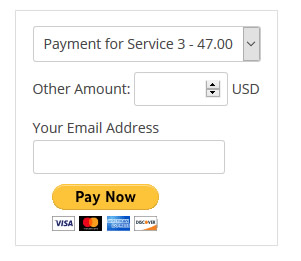
This plugin supports one-click payment for a product or service as shown in this example.
The plugin works a few different ways. You can use a shortcode to insert the payment form anywhere on your website. Another option is to call the function from a template file. Finally, you can use the “WP PayPal Payment” widget from the Widgets menu.
This plugin offers multiple payment options, custom images for the payment button, tax collection, shortcode parameters for more customization, and the option to return a user to a specific page after payment (like a thank you page).
WP Easy PayPal Payment Accept does not support a shopping cart.
Pros
- Buy-now and donation buttons through shortcodes
- PayPal Commerce Platform buttons with sandbox mode
- Free, with no store or cart needed
Cons
- No cart, order management or inventory
- Needs PayPal API credentials and a business account
- Breaking changes in the 5.x PayPal API upgrade
WordPress Simple PayPal Shopping Cart

With a wide-ranging array of options, WordPress Simple PayPal Shopping Cart is worth checking out if you want to add multiple offerings to your site with product variations and a full eCommerce experience.
This is a lightweight plugin that doesn’t slow down your site but still delivers the more robust option of a shopping experience with an “Add to Cart” button and PayPal checkout. Shoppers even get the ability to remove items or change the quantity of their items.
WordPress Simple PayPal Shopping Cart integrates with NextGen Photo Gallery plugin to accommodate the selling of photographs. And, the plugin supports PayPal smart checkout/buttons as well as the selling of services, digital goods, and physical products.
Pros
- Add-to-cart buttons through shortcodes
- PayPal and Stripe checkout in the free code
- Coupon discounts and an orders list in the admin
Cons
- Not a full store system
- Extra features are separate add-ons
- Payment gateways need your own PayPal or Stripe account
WordPress PayPal (WP PayPal)
The WordPress PayPal plugin allows you to add payment buttons to your pages and posts using shortcode.
- Buy Now
- Add to Cart
- Donate
- Subscribe
For such a simple plugin, WP PayPal offers quite a few robust features.
For example, it supports recurring payments in case you want to offer a subscription on a daily, weekly, monthly, or even yearly basis. The plugin also supports adding multiple items to the shopping cart, coupons/discounts, and multiple currencies.
You can even charge shipping and tax as well as sell items that require different options, such as color, size, or price.
Compatible with any WordPress theme, this plugin also lets you view and manage orders from your WordPress dashboard, which is extremely convenient.
Pros
- PayPal Checkout with a sandbox mode for testing
- Product and checkout shortcodes for buy-now buttons
- Orders kept in the dashboard with a debug page
Cons
- Many features are sold as separate paid add-ons
- Needs PayPal API keys and sandbox setup before going live
- Fewer store features than a full e-commerce plugin
Quick PayPal Payments
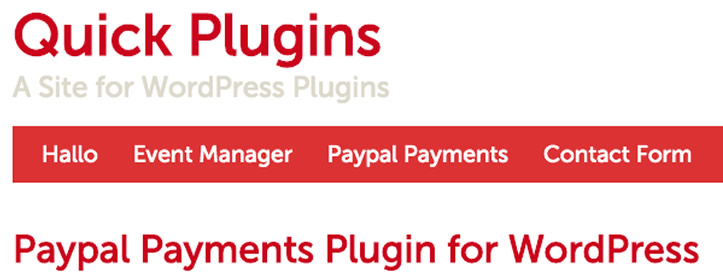
Quick PayPal Payments differentiates itself from other similar plugins by supporting variable payments. The plugin allows customers to fill in a form with a reference number (like an ID or invoice number) and the amount to pay. And, it only takes the shortcode [qpp] to make it happen!
Generally speaking, when you think about online payments, you imagine paying for products. Yet, Quick PayPal Payments offers a solution for small businesses to easily accept payments online for invoices and services rendered.
In addition to variable payments, this plugin offers the more standard options too, such as form styling, coupon codes, preset IDs and amounts, multiple forms on one site, GDPR compliance, and some customization.
Pros
- No developer or API keys needed
- Unlimited forms in any PayPal currency
- Shortcode, block and widget placement
Cons
- Postage, coupons and recurring payments need a paid plan
- Tracks usage only if the admin opts in
- Depends on PayPal's classic checkout endpoints
PayPal Buy Now Button

The name of this plugin aptly describes what it does: you can add a PayPal “Buy Now” button anywhere to your website to sell products or services.
Accepting payments doesn’t get any simpler than this! The plugin adds a PayPal button inserter to your editing area. All you do is click the button inserter and enter a few details. Then the Buy Now button is created for you and inserted into your page or post.
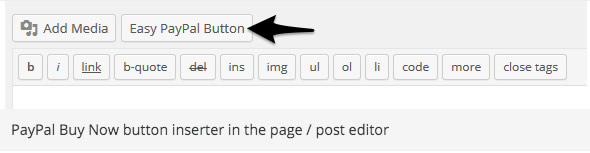
Adding a PayPal button is as easy as clicking your mouse with this plugin.
This plugin works with any WordPress theme. You can choose from four different PayPal button designs as well as how the PayPal window opens and your successful payment URL.
Pros
- Buy Now buttons placed anywhere with a shortcode
- PayPal and Stripe checkout without a full store
- Setup helpers for PayPal and Stripe accounts
- Simple button manager in the admin
Cons
- No catalogue, cart or stock management in the free edition
- PayPal and Stripe connection goes through the vendor's wpplugin.org relay
- Pro features are sold separately
Easy PayPal Shopping Cart

If you liked the simplicity of the Buy Now Button plugin above but prefer a shopping cart, then Easy PayPal Shopping Cart is an alternative.
This plugin makes it possible to sell products or services on your site using “Add to Cart” and “View Cart” buttons. The shopping cart itself is hosted on PayPal.

An example of PayPal shopping buttons.
The plugin works with any WordPress theme, and you can place the cart buttons anywhere on your site.
Similarly to the PayPal Buy Now Button plugin, Easy PayPal Shopping Cart adds a button inserter option to your editing area. You click the button inserter where you want to insert the cart button, fill out a few details, and you’re done.
Pros
- Add to cart buttons placed with shortcodes
- Separate cart shortcode for a PayPal cart
- Sandbox mode for testing before going live
Cons
- No tax, shipping or option fields in the free edition
- Checkout is handled entirely by PayPal
- Pro upgrade needed for custom button images
PayPal Events

Selling tickets to events often require different functionality than selling products. That’s why the PayPal Events plugin is a nifty solution.
All you need to do is enter your PayPal information, set up an event, place the shortcode on your site, and you’re ready to sell tickets. An e-ticket containing a QR code gets sent to each customer after purchase.
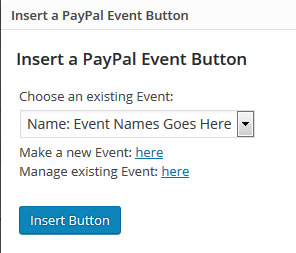
Selling tickets is easy with the PayPal Events plugin.
Many event plugins offer more complex options, which can be good if you require detailed event management. But, if you desire more basic ticket fulfillment, PayPal Events is a straightforward plugin that makes selling tickets online via PayPal as uncomplicated as possible.
Pros
- Ticket buttons placed with one shortcode
- Orders listed in the admin with bulk actions
- Confirmation emails to buyer and site admin
- PayPal sandbox mode for testing
Cons
- Free edition limited to three items per event
- Pro upgrade needed for tax, custom button image and return URL per event
- Relies on PayPal only, with no other gateway
PayPal Donations

Need to accept donations? The PayPal Donations plugin makes it possible. Simply add a PayPal donation button to your site via shortcode or a sidebar widget.
You get to choose which donation button to use, including the option to use your own button. Another nice feature is that you are able to set an optional default Purpose and Reference. With each instance of the button, these settings can be overridden.
Pros
- Donate button through a shortcode or widget
- Choose standard or custom button images
- Sandbox mode for testing
Cons
- Donations go straight to PayPal with no on-site records
- Shows admin notices when PHP or WordPress is too old
- Only a donate button, no recurring or tiered donations
PayPal Donation

Similar to the donations plugin above, the PayPal Donation plugin works as a button and as a sidebar widget where you can choose from multiple button designs or upload your own. Donors can use their PayPal account or credit card to donate.
If you’re looking for flexibility when it comes to customizing the donation buttons, PayPal Donation lets each button have its own:
- language;
- currency;
- image; and,
- PayPal account.
You may set up a drop-down menu of predetermined amounts if you want more control over donations.
Pros
- Donation buttons by shortcode, widget or media button
- PayPal and Stripe payment options
- Donation orders listed in the admin
Cons
- Needs a PayPal or Stripe account to take payments
- Pro version with more features is sold separately
PayPal Express Checkout Payment Gateway for WooCommerce
If you’re using WooCommerce for your online store, there’s the PayPal Express Checkout Payment Gateway for WooCommerce plugin that lets you accept payments through PayPal’s gateway.
You’ve got multiple payment choices with this plugin, including credit cards or PayPal Money. The user can complete the order from the cart page, and there’s a faster checkout by skipping the order review page.
Users never leave your site when making payments, which streamlines the shopping experience.
Pros
- Express and Smart buttons on cart and checkout pages
- Pay Later and Venmo offered where PayPal makes them available
- Sandbox and live modes
Cons
- Product-page buttons and mini-cart need the paid version
- Refunds from the order screen need the paid version
- Requires a PayPal developer account with API credentials
Visit PayPal Express Checkout Payment Gateway for WooCommerce
CP Contact Form With PayPal
Maybe you’re looking to use a form with your payments, such as a contact, booking or order form. The CP Contact Form with PayPal plugin inserts a form into your WordPress website and connects it to a PayPal payment.

With the click of an icon, insert a form with payment functionality into your post.
Here’s how it works:
After the user fills out the form fields and clicks the Submit button, the posted data is saved into the WordPress database and the user is redirected to PayPal to complete the payment.
After the payment is completed, your website’s administrator (aka the email you’ve listed in your WordPress settings) receives an email with the form data and the user receives a confirmation/thank you email.
All of the forms show in the WordPress settings area and appear as either “Paid” or “Not Paid.”
Some of the extra features include optional captcha, recurring payments, donations, refunds, and a GDPR acceptance field.
Pros
- Contact, payment and donation forms in one plugin
- PayPal payments with submissions stored in the database
- Shortcode, block and Elementor widget placement
Cons
- Stripe, Authorize.Net, Mollie and CRM options need the commercial versions
- Deactivation survey sends data to the vendor when submitted
Contact Form 7 – PayPal & Stripe Add-on

Already using Contact Form 7 on your website? If so, you can integrate PayPal (and Stripe) payments through a simple add-on.
With this plugin, you may give each form its own PayPal settings. After a user submits a form, they are redirected to PayPal for payment.
Pros
- Per-form PayPal and Stripe settings inside the Contact Form 7 editor
- Payments history stored as a post type
- PayPal sandbox mode, currency and language options
- Works with PayPal only, Stripe only or both
Cons
- Free version adds a 2% per-transaction fee
- Form email is sent before payment; payment-gated email is Pro
- Stripe Connect and PayPal onboarding run through the vendor's server
Choosing the Best WordPress PayPal Plugin for Your Needs
We’ve come to the end of the list! Now that you know how to add PayPal to your site, which plugin will you choose?
You may want to think about a few things before moving forward.
Your Requirements
Figure out your “what” first. What do you need to accomplish? What is your end goal?
Identifying your requirements and goals will limit your options to help you decide which plugin makes the most sense.
When to Level Up to Pro
These free PayPal plugins offer enough features and functionality to get you started. But, if you don’t see what you need, don’t hesitate to upgrade to a paid plugin.
Most of these plugins offer a Pro version. If the paid option gives you what you need, it’s probably time to upgrade. You’ll likely save time and money in the long run by investing in a better solution now rather than later.
You’ve certainly got plenty of options to collect payments online via PayPal. Who’s to say which of these plugins is the absolute very best? You! We’ve given you the list, now it’s up to you to choose the one that meets your needs and take action.
If you feel like it, feel free to share in the comments which plugin you chose and why. And, if there’s a favorite PayPal plugin we missed, please let us know!