Are you looking for a way to boost user engagement on your WordPress website? If so, you might want to look into ramping up your site’s comment section. Comments have the potential to add real value to your website. They encourage interaction, pique the interest of people reading your content, and can even help your content reach a bigger audience…
There are many different WordPress comment plugins to pick from these days. And since they all do different things, it can be tough to know which one is the right choice for you. That’s why today we’re going to highlight the best WordPress comment plugins in the market, so you can decide which solution to use on your website.
But first, let’s check out the importance of having a comment section on your website.
Why Have Comments on Your WordPress Website?
Though there are some downsides to allowing comments on your WordPress website, there are plenty more reasons to include a comment section.
- Increased Interaction: opening up the comment section on your website not only gives people an easy way to discuss the content they are reading, but gives you an opportunity to interact with your site visitors. Answer questions, direct people to other resources, and even convert more readers into customers if you run an eCommerce shop using your site’s comment section.
- Content Ideas: scanning your site’s content to see what people are talking about the most is a great way to generate more content for your site’s blog. After all, your blog should be valuable to the reader and offer them solutions to their problems. There’s no better place to find where people’s hangups are than in the comment section.
- SEO Boost: you might not realize this, but your site’s comment section can help your site’s overall SEO performance. People mentioning keywords that are indexed by Google will help you rank higher and in more relevant search results. Plus, the longer people linger on your site interacting with other users, the higher you’ll rank.
- Feedback: sometimes it’s hard to know what improvements you should be making to increase conversions. Luckily, some people will tell you exactly how they feel about your content, products, or services right in the comments for you to see. Find out what people like (and don’t like) and adjust accordingly.
- Improved Community: the more loyal your readers and customers are, the better. By allowing people to interact with your content regularly, you build a longer-lasting, stronger community. This can help your business or following grow.
Of course, there are some things to be careful of when you allow comments on your WordPress website, such as spam. That’s why it’s important you research the comment plugin you use on your site.
What about the native WordPress Comments System?
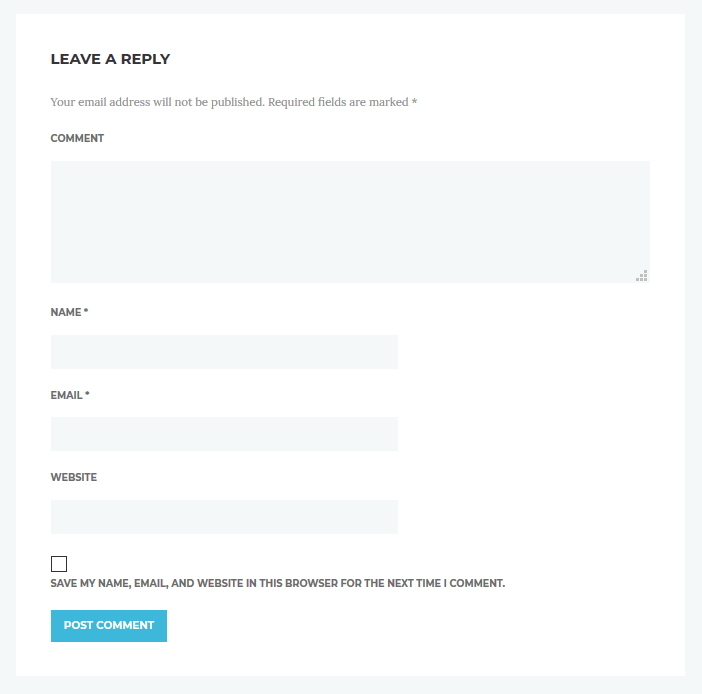
By default, WordPress has a native commenting system that’s available to all WordPress users. While the theme you’re using will dictate the general styling of your comment section, all comments will have the same format: Comment, Name, Email, and Website.
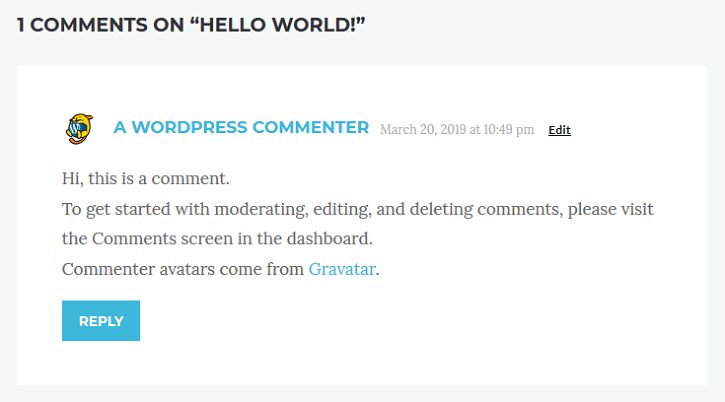
When filled out, this is what a comment will look like on your website:

The problem with the default system is that it’s very basic. It hasn’t been updated in a long time, and has the following disadvantages:
- Users don’t receive response notifications making it harder to continue the conversation
- There’s no support for nested conversation threads making it difficult to follow a single discussion involving multiple people
- It lacks social media integrations for social sharing
- Spam is a never-ending battle unless you implement another solution on your site
Because of these issues, we recommend looking into other comment plugin solutions so you have a better experience. So, let’s take a look at the best WordPress comment plugin options out there.
| Product | Price | Rating | Active installs |
|---|---|---|---|
| Jetpack Comments | Free | ||
| Disqus Comment System | Free | 2.7/5 | 30,000+ |
| Simple Comment Editing | Free | 4.8/5 | 2,000+ |
| Lazy Load for Comments | Free | 4.7/5 | 2,000+ |
| Thrive Comments | Paid | ||
| wpDiscuz | Free | 4.7/5 | 60,000+ |
| Social Login | Free | 4.3/5 | 4,000+ |
| Voice Comments & Reviews | Free | 4.6/5 | 80+ |
| WpDevArt Facebook Comments | Free + paid | 4.3/5 | 7,000+ |
| Comment Experience by Progress Planner (formerly Yoast Comment Hacks) | Free | 3.5/5 | 500+ |
| GraphComment | Free | 4.7/5 | 400+ |
| Disable Comments | Free | 4.7/5 | 1M+ |
Jetpack Comments
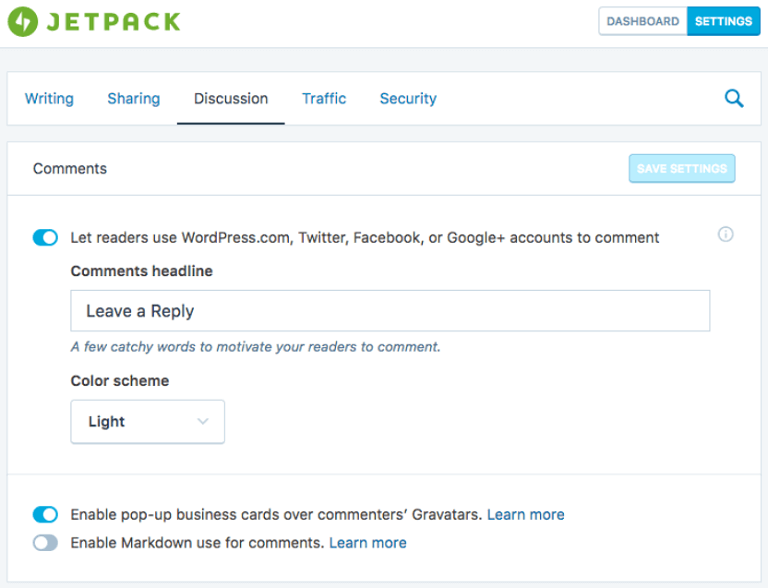
Jetpack Comments is a module included in the Jetpack plugin suite that replaces the default comment system in WordPress. In fact, some will say that Jetpack simply takes the native WordPress comment system and makes it better.

Users leaving comments must input their name and email (website is optional) and can login using their WordPress.com, Twitter, or Facebook accounts with one click. They can also choose to receive follow-up comment and new post notifications, which helps increase engagement on your website.
Other features include:
- Customizable color scheme
- Popup business cards over commenters’ Gravatars
- Easy integration with comment spam solution Akistmet (also owned by Automattic)
Price: FREE
Disqus Comment System

Disqus Comment System is a popular WordPress comment plugin that helps you boost engagement, grow your audience, drive traffic to your site, and monetize your content. It installs within minutes and even allows you to import existing comments into the new system so nothing is ever lost.
The only drawback is that it requires users to sign in before being allowed to comment on your site (however this can also help ward off spam).

With Disqus, you can enable email notifications so commenters always know what’s going on, even after they’ve left your site. Plus, this comment plugin supports nested comments and social logins, making the user experience more seamless and enjoyable for everyone interacting in the comment section.
Other features include:
- Video and image comment capability
- Commenting via Disqus account
- Comment monitoring via the front or backend of your site and/or email
Price: FREE
Pros
- Hosted commenting with threads and comment counts
- Optional single sign-on for commenters
- Comments sync through the Disqus API
Cons
- Comments and commenter data are stored on Disqus servers
- Free Disqus accounts can show ads in the comment section
Simple Comment Editing

Simple Comment Editing adds a basic feature to your native WordPress comment system: it lets commenters edit their comments for up to five minutes after posting.
People are more likely to leave thoughtful comments on your website if they know they have the option to edit and/or delete it if they change their mind after clicking Submit. Plus, this gives people an easy way to fix silly typos that are so often found after submitting a comment.

To use this comment plugin all you have to do is install and activate it. There are no settings to configure or styling requirements, making it very user-friendly.
Other features include:
- Set, stop, or hide the comment timer
- Button styles to match your theme
- Set minimum comment length
Price: FREE
Pros
- Commenters can fix typos for a short window
- Optional WooCommerce review rating field
- Optional Mailchimp subscribe checkbox
Cons
- Edit window is short, five minutes for anonymous users
- Mailchimp option needs an API key
- Advanced changes need filters
Lazy Load for Comments

Lazy Load for Comments is not a replacement for the native WordPress comment system. It also doesn’t change the frontend of your site’s comment section either. But what it does do is improve the speed and performance of your website, which is very helpful for highly trafficked sites that have a lot of commenting activity.

You can choose to lazy load comments based on click or scroll, so that you get rid of unwanted HTTP requests that are known for slowing your website’s speed. Only when a user performs the assigned action (click or scroll) will the comment section appear on your site. And since your comment section is below your site’s content, not displaying the comment section right away will not harm the user experience.
Price: FREE
Pros
- Comments load only on scroll or click
- Works with classic and block themes
- Settings for button text and minimum comment count
Cons
- Comments are missing from the first HTML response
- Needs a visitor action before comments appear
- Depends on JavaScript to load comments
Thrive Comments

Thrive Comments, brought to you by Thrive Themes, is another powerful premium comments plugin for WordPress. Its main priority is to help you increase conversions on your website, which most comment systems don’t do. In fact, have you ever received anything in return for leaving a comment on a website’s blog? Maybe on a rare occasion. But that definitely isn’t the norm, and Thrive Comments seeks to change that.
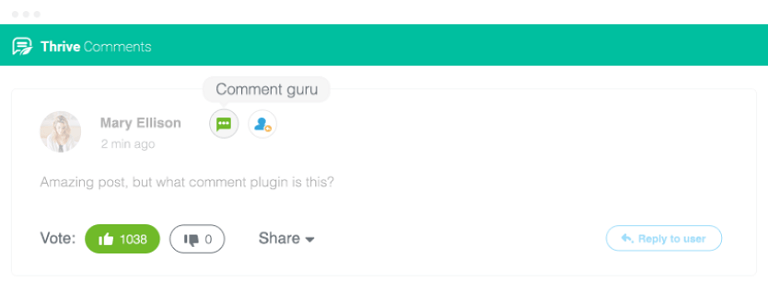
With this unique comment system solution you can encourage people to comment on your site by letting people use the voting system or earn badges for high-quality comments, redirect first-time commenters to a welcome page with a coupon code to your eCommerce shop, and so much more.
Other features include:
- Social sharing of comments to reach a broader audience
- Display related posts to guide people through your site
- Commenting from social networks
- Lazy load for speed optimization
- Detailed reports for making better data-driven decisions
Price: Single site license $39
Cons
- Paid licence; no free version
wpDiscuz

wpDiscuz sets out to be a hassle-free alternative to Disqus (mentioned above). Create custom comment forms and fields, enable AJAX loading for optimal performance, and keep everything that happens in your comment section in your WordPress database.
With wpDiscuz, you can enjoy features like allowing/disallowing comments on certain content, enabling social login functionality, configuring comment sorting, and even comment editing. You can also take advantage of sticky comments, nested comments, built-in Gravatar caching, and the smart voting system to entice people to not only leave their thoughts, but interact with other commenters.
Other features include:
- Content author notifications
- Lazy load comments on scrolling
- Built-in anti-spam features
- Social sharing to Twitter and Facebook
Price: FREE
Pros
- Comments stored in the site's own WordPress database
- AJAX comments, threaded replies, voting and ratings
- Social login and reCAPTCHA in the free core
Cons
- Some options appear as locked previews until a paid add-on is bought
- Some features depend on third-party provider settings
- Admin add-on screens and paid teasers add to the settings screens
Social Login

Social Login takes logging in to comment using a social network to the next level. Let your site visitors choose from over 40+ social networks, including the popular ones like LinkedIn, Facebook, PayPal, Yahoo, and Twitter. This comment solution helps you combat spam, ensures a seamless commenting experience, and gives you the power to select which social networks to allow.
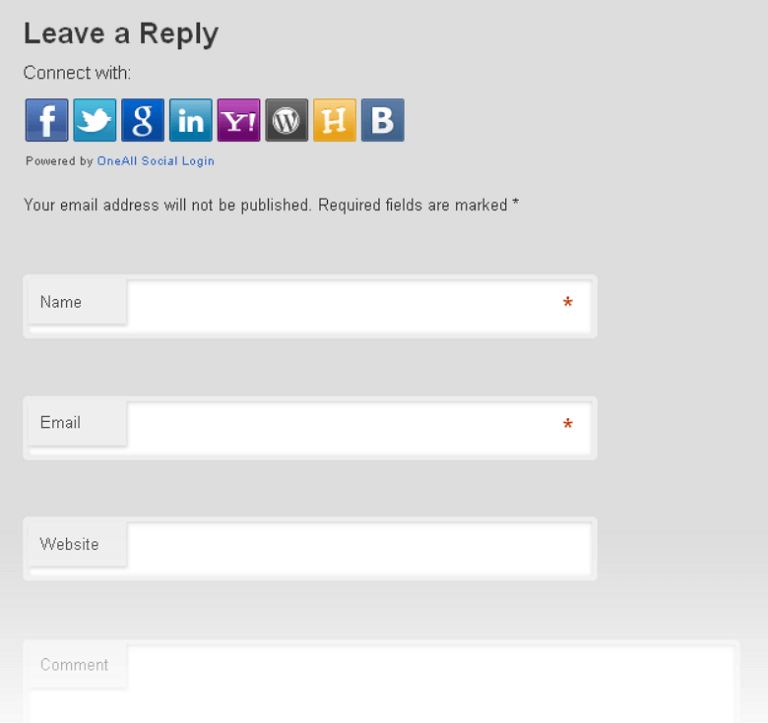
Other features include:
- Social logins for registered users
- GDPR compliance
- Updated social logins only
Price: FREE
Pros
- Sign-in buttons for login, registration and comment forms
- Users can link several social accounts to one profile
- Works with BuddyPress and WooCommerce forms
Cons
- Every sign-in goes through the OneAll API service
- Some features need the premium version enabled in a OneAll account
- Site depends on a third-party service for login
Voice Comments & Reviews

Voice Comments & Reviews takes a unique approach to comments left on your website. Proven to help boost engagement, drive traffic, and help your site rank better, this comment plugin for WordPress lets site visitors leave voice comments for others to hear, which is a great way to get the conversation going.
It requires email authentication to help you fight spam, lets you display an unlimited number of voice comments, and comes with tools to help you customize the comment section to match your brand. Plus, it comes in over 20 different languages so you can reach your international audience and get them interacting with your content and other readers.
Other features include:
- Audio, video, and voice commenting allowed
- 24/7 support
- One-click social media sharing
Price: FREE
Pros
- Adds voice comments without custom code
- Optional WooCommerce product reviews tab
- Comments and accounts are managed by the Heyoya service
Cons
- Sends the admin email and password to the vendor during login
- Some vendor calls disable TLS certificate verification
- Comments and user data live on the vendor's service, not the site
WpDevArt Facebook Comments
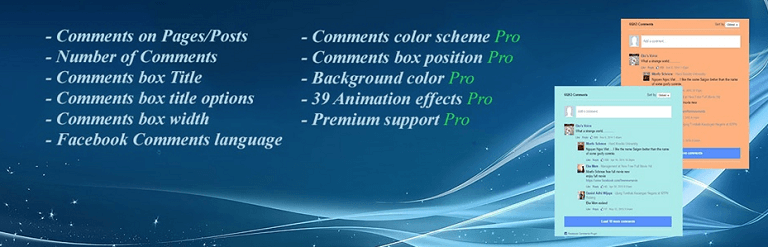
WpDevArt Facebook Comments is a tool that shows your site visitors your brand’s Facebook comments so they can pipe in with their opinions too. It comes compatible with other WordPress plugins, and lets you customize things like the box Title, text colors and fonts, and display position.
In addition, this comment plugin that integrates with Facebook gives you the freedom to customize comment ordering and number displays, as well as the language, so that your target audience can engage in their native language. You can unlock additional features by investing in the premium version of WpDevArt Facebook Comments.
Premium features include:
- Multiple color schemes
- Customizable background colors
- 39+ animation effects
- Premium support
Price: FREE (premium plans start at $10)
Pros
- Facebook Comments box under posts and pages
- Shortcode and automatic insertion options
- Per-post control and ordering settings
Cons
- Comments are stored by Facebook, not WordPress
- Loads Facebook's SDK in visitors' browsers
- Needs a Facebook App ID to be configured
Yoast Comment Hacks

Yoast Comment Hacks, built by the same team responsible for the popular SEO plugin Yoast SEO, aims to make managing comments on your WordPress website easier than ever. It does this by creating small hacks in the native WordPress comment system to extend the functionality and make things more user-friendly for you and your readers.
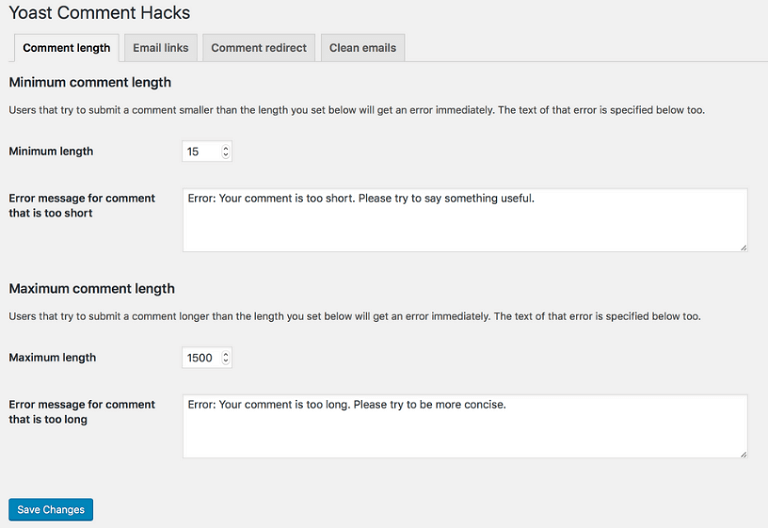
For example, send out cleaner looking comment notification emails, set comment length minimums and maximums, and even send first-time commenters to a custom URL such as a thank you page, which can also feature a section for them to sign up for your email list, a coupon code to use in your online store, and much more.
Other features include:
- Button in the WordPress toolbar for emailing all commenters at once
- Manual comment approval process to reduce spam
- Ability to change comment parent ID
Price: FREE
Pros
- Free, GPL licence
- Cleaner comment notification emails
- Optional comment policy that commenters must accept
- Minimum and maximum comment length
Cons
- Changes core comment behaviour, so test it on a staging copy first
- Does not add spam filtering or storage
- Notification email links point at an IP lookup service
Visit Comment Experience by Progress Planner (formerly Yoast Comment Hacks)
GraphComment

GraphComment is a powerful commenting plugin with a modern, clean look that is organized and easy for readers to follow, no matter how many people have left comments. It’s optimized for performance, so your site speed is never sacrificed, and you can easily manage all comment in the WordPress dashboard.
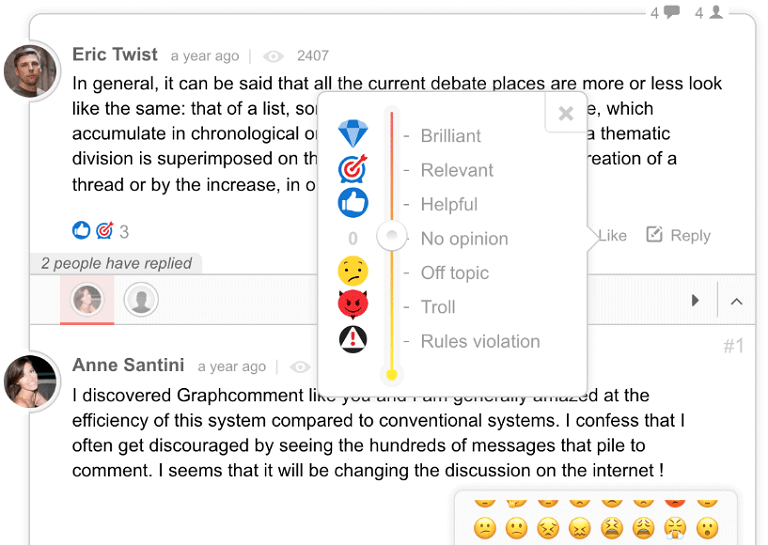
Additionally, GraphComment lets you auto-sync (backup) all comments from GraphComment to your WordPress database, so you never lose old comments and can refer to them later. Plus, you are notified immediately whenever a new comment is pending so you can approve and post them right away.
Other features include:
- SEO-friendly structure so your comments are crawled and indexed
- Responsive design so those on-the-go can comment
- Social network connections, voting system, and social sharing
Price: FREE
Pros
- Replaces native comments with a hosted comment system
- Synced back to the WordPress database
- Optional WooCommerce product page comments
Cons
- Requires a GraphComment account and vendor service
- Some options such as SSO, overlay and read-only are locked to account plans
- Sends install and activation events to the vendor without asking
Disable Comments

Though we believe in the benefits of allowing comments on your WordPress website, there may come a time when you want to disable comments on your site.
Luckily, the Disable Comments plugin lets you globally disable comments on any post type (posts, pages, attachments, etc.). And if you run multisite installations, you can disable comments across your entire network too.
Keep in mind this plugin cannot selectively disable comments on your website.
Price: FREE
Pros
- Site-wide, per post type or per post rules
- Bulk delete with a preview and export before deleting
- Blocks REST API and XML-RPC comment endpoints
Cons
- Deleting comments is permanent once confirmed
- Optional usage tracking sends data to WPInsight once opted in
18. BONUS: WordPress Comment Spam Plugins
For many website owners, the decision to allow (or not allow) comments on their website comes down to spam. And the truth is, dealing with comment spam is a dreadful battle you can’t win on your own.
Luckily, there are some really great WordPress anti-spam comment plugins in the market that take care of the comment spam for you:
- Akismet Anti-Spam
- Anti-spam Pro
- Antispam Bee
- Spam Protection by CleanTalk
- Stop Spammers
- Spam Destroyer
All you have to do is choose the plugin that’s right for you and use it to complement whatever WordPress comment plugin you have installed on your website.
And there you have it! The very best WordPress comment plugins in the market to date. If you’re looking to boost engagement, drive more traffic your way, and land more conversions, giving the native WordPress comment system a makeover with any one of these comment solutions is the way to do it.
Have you used any of the above-mentioned comment plugins on your WordPress website? Have we left off a solution you think should be added? If so, we would love to hear all about it in the comments below!